There is one important thing to understand before anything else.
Delta Executor is not an official Roblox application. Roblox says that modified versions of its app and software that changes how Roblox works are not allowed. Roblox also says that using such software can result in account action, including suspension or permanent bans in repeated cases.
So this guide focuses on giving you accurate information about the iOS environment rather than promising that Delta is “undetected,” “100% safe,” or guaranteed to work on every iPhone.
Delta Executor iOS Quick Information
| Information | Details |
|---|---|
| Name | Delta Executor |
| Platform | iPhone and iPad |
| Operating system | iOS / iPadOS |
| Common package format | IPA |
| Official Roblox app | Separate application |
| Distribution | Depends on the current Delta release and signing method |
| Root required | No iOS root system exists in the Android sense |
| Jailbreak | Not recommended |
| Current iOS support | Depends on the Delta build and installation method |
| Key system | May vary by release |
| Certificate status | Can change or become revoked |
| Roblox compatibility | Depends on Roblox, device, iOS version and Delta environment |
Apple's software distribution model makes iOS considerably different from Android. An IPA file is not simply equivalent to an APK that you can install with one tap. That difference is the key to understanding Delta on iPhone.
Table of Contents ▼
- 1. What Is Delta Executor for iOS?
- 2. Does Delta Executor Work on iPhone?
- 3. Does Delta Executor Work on iPad?
- 4. What Is an IPA File?
- 5. Delta IPA vs Android APK
- 6. What Does “Signed IPA” Mean?
- 7. Why Does Delta iOS Stop Working Suddenly?
- 8. What Does “Untrusted Enterprise Developer” Mean?
- 9. What Is an iOS Certificate?
- 10. What Does “Certificate Revoked” Mean?
- 11. Why Does Delta iOS Work for One Person but Not Another?
- 12. Current iOS Requirements for Roblox
- 13. Delta Executor iOS System Requirements
- 14. How to Check Your iPhone's iOS Version
- 15. How to Check Your iPhone Model
- 16. Delta Executor iOS Installation Methods
- 17. How to Install Delta Executor on iPhone
- 18. How to Sideload Delta IPA on iPhone
- 19. What Is Direct Install on Delta iOS?
- 20. Delta iOS Direct Install Not Working
- 21. Delta iOS Certificate Revoked Fix
- 22. Delta iOS App Won't Open
- 23. Delta iOS “Unable to Verify App” Error
- 24. Delta iOS “Developer Not Trusted” Error
- 25. Delta iOS App Crashes
- 26. Delta iOS and Roblox Updates
- 27. Why Does Delta Stop Working After a Roblox Update?
- 28. Delta iOS and Roblox Security
- 29. Does Delta Executor Require a Jailbreak?
- 30. Delta iOS and Apple Security
- 31. Is Delta Executor Safe on iPhone?
- 32. Can Delta iOS Steal Your Roblox Account?
- 33. Can Delta iOS Get Your Roblox Account Banned?
- 34. Delta iOS and Jailbroken Devices
- 35. Delta iOS and App Store
- 36. Delta Executor vs Delta Emulator
- 37. Delta Executor iOS vs Android
- 38. Delta Executor iOS vs PC
- 39. Delta iOS Key
- 40. Delta iOS Key Not Working
- 41. Delta iOS Scripts
- 42. Delta iOS Script Not Working
- 43. Delta iOS Not Compatible
- 44. Delta iOS Installation Failed
- 45. Delta iOS Profile Not Appearing
- 46. Delta iOS Keeps Reinstalling
- 47. Delta iOS Storage Requirements
- 48. How to Update Delta Executor on iPhone
- 49. Why Does Delta iOS Get Revoked?
- 50. Is There a Permanent Delta iOS Certificate?
- 51. Why Isn't Delta iOS Opening Today?
- 52. Delta iOS Status
- 53. Delta iOS Safety Checklist
- 54. Delta Executor iOS: Common Problems at a Glance
- 55. Frequently Asked Questions
- 56. Final Thoughts
What Is Delta Executor for iOS?
Delta Executor for iOS is a third party Roblox scripting tool associated with running compatible Roblox scripts on Apple mobile devices.
The iOS version is commonly discussed for iPhone, iPad, iOS, iPadOS, IPA installation, direct installation, sideloading, signed applications, certificates, and the Delta Key.
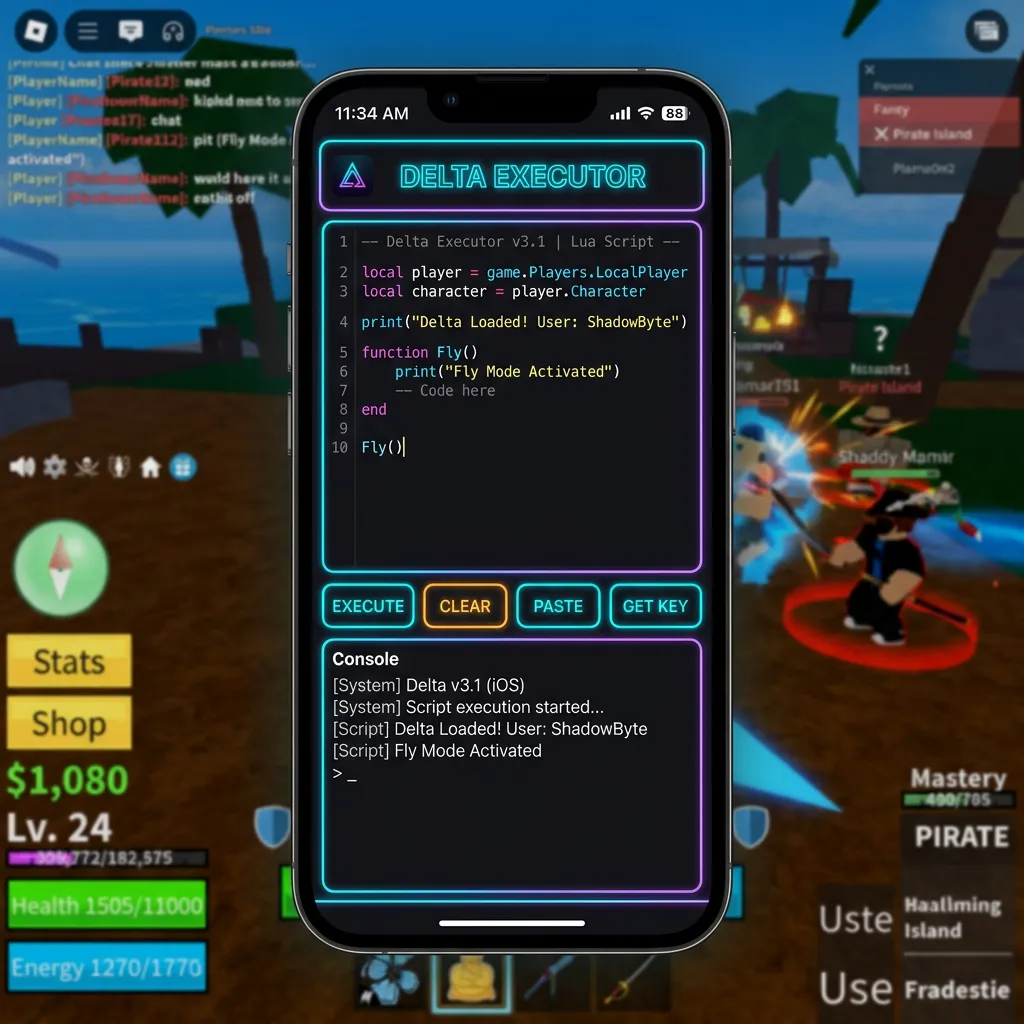
The exact installation method can change over time. This is because iOS applications need to be properly signed and provisioned before iOS will allow them to run outside Apple's normal App Store distribution path. That makes iOS availability much more sensitive to certificates and signing services than Android APK availability.
Does Delta Executor Work on iPhone?
Public Delta websites currently advertise iPhone and iPad versions, but availability can change depending on the current build and signing method. One current Delta page, for example, lists an iPhone/iPad release and provides both direct-install and IPA-based options.
However, “an iOS version exists” and “the application will install and work on your iPhone today” are not the same statement.
The actual result can depend on iOS version, iPhone model, iPad model, Delta build, signing certificate, provisioning, installation method, Roblox version, device security state, and whether the certificate has been revoked. This is one of the biggest differences between iOS and Android.
Does Delta Executor Work on iPad?
The same general principles apply to iPad. Roblox officially supports iPadOS devices meeting its current requirements. Roblox currently requires iOS 14 or iPadOS 14 and later, with supported device families including iPad Air 2, iPad mini 4, iPad 5th generation, iPad Pro, and later compatible devices.
That does not automatically mean every Delta build supports every supported iPad. The Delta application has its own compatibility requirements. So there are two separate questions: Can the iPad run Roblox? and Can the current Delta build run in the iPad's environment? Those should never be treated as the same thing.
What Is an IPA File?
An IPA is an application package used for iOS and iPadOS applications. It is broadly comparable to an APK on Android, but the installation process is different.
An APK can often be installed directly after Android permits installation from an external source. An IPA normally needs the correct signing and provisioning before iOS will accept and launch it. This is why downloading a Delta IPA does not necessarily mean you can immediately tap it and open the application. The file is only one part of the process.
Delta IPA vs Android APK
This is an important difference for users moving from Android to iPhone.
| Android | iOS |
|---|---|
| APK | IPA |
| External APK installation is common | External IPA installation is more restricted |
| Android package permissions | iOS signing and provisioning |
| APK can be installed through supported external methods | IPA generally requires a valid signing method |
| Android security model | Apple's application security model |
| Root is an Android concept | Jailbreak is the closest comparable modification concept |
So if you previously used Delta on Android, do not expect the iPhone version to install in exactly the same way.
What Does “Signed IPA” Mean?
An iOS application needs a valid signature for the device to accept it under the relevant installation method.
When people talk about a signed IPA, they generally mean that the application package has been signed using a certificate and provisioning information that allows iOS to install or launch it under the applicable distribution method.
This is why iOS Delta pages often mention Signed IPA, Certificate, Developer, Enterprise, Provisioning, Sideloading, Trust, and Revoked certificates. These are not random technical terms. They are part of Apple's application security and distribution model.
Why Does Delta iOS Stop Working Suddenly?
This is one of the most important iOS questions. An application can stop launching even though the IPA file itself has not changed. One possible reason is the signing certificate.
If the certificate used to authorize the application becomes invalid or revoked, iOS may stop allowing the application to launch. This creates a situation where a user says: “Delta worked yesterday, but today it won't open.” The APK or IPA may not be the real problem. The signing status may have changed. This is a major difference from normal Android installation.
What Does “Untrusted Enterprise Developer” Mean?
If iOS displays an Untrusted Enterprise Developer message, it generally means the application was installed using a distribution method that requires the developer or organization profile to be trusted before iOS will allow the app to launch.
Current public Delta installation pages specifically describe this message as part of their direct-install process. The exact settings path can change between iOS versions, but it is commonly associated with the device's profile or device-management settings.
Do not blindly trust an unknown developer profile. Before approving a profile, understand: Who issued it, where the application came from, why the profile is required, and whether you trust the source. A profile being installable does not automatically prove that the application itself is trustworthy.
What Is an iOS Certificate?
A certificate is part of the system used to establish that an application has been signed under a particular identity and distribution arrangement.
For third party application installation, certificates are particularly important because Apple controls whether they remain valid. This creates a common problem in the Delta iOS ecosystem: a working installation method today may stop working later. That is why we should never promise that one direct-install certificate will remain available forever.
What Does “Certificate Revoked” Mean?
A revoked certificate means Apple has invalidated that certificate for the relevant purpose. If Delta was installed using that certificate, the application may stop launching.
Users may see: App opens and immediately closes, application cannot be verified, developer cannot be verified, app suddenly becomes unavailable, or installation succeeds but launch fails. When this happens, reinstalling the exact same signed copy may not solve the problem. The signing source itself may need to change.
Why Does Delta iOS Work for One Person but Not Another?
This is another area where iOS users often become confused. Two people can have the same iPhone model, the same iOS version, and the same Delta file, and still get different results.
Why? Because their installation state can be different. One device may have a valid certificate, a revoked certificate, a different provisioning profile, an older installation, a different signing source, or a different iOS version. This is why user reports such as “it works for me” do not prove universal iOS compatibility.
Current iOS Requirements for Roblox
Roblox currently requires iOS 14 or iPadOS 14 and later on supported Apple mobile devices. Roblox lists supported minimum device families including iPhone 6s, iPhone 6s Plus, iPhone SE, iPod touch 7th generation, iPad Air 2, iPad mini 4, iPad 5th generation, and iPad Pro. Newer devices are also supported when they meet Roblox's current requirements.
Remember that these are Roblox requirements, not a guarantee that Delta will support the same devices. A phone can run Roblox perfectly and still fail to run a particular third party application.
Delta Executor iOS System Requirements
There is no single Delta iOS specification that can safely be applied to every release. The most useful baseline is:
- Supported iOS or iPadOS version
- Compatible iPhone or iPad
- Enough free storage space
- Stable internet connection
- Current Roblox application
- Compatible Delta build
- Valid installation/signing method
Do not confuse Roblox's minimum device requirement with Delta's actual compatibility. A phone can run Roblox perfectly and still fail to run a particular third party application.
How to Check Your iPhone's iOS Version
You do not need another application. On the iPhone, navigate to Settings → General → About and look for iOS Version. Roblox also documents this exact method for checking the current operating system version. On an iPad, the process is essentially the same. Knowing the exact iOS version is useful when troubleshooting because compatibility claims often depend on the operating system version.
How to Check Your iPhone Model
Go to Settings → General → About and look for Model Name and Model Number. This helps you determine whether your device is within the supported Roblox hardware range. It also gives us more useful information than simply saying: “I have an iPhone.” An iPhone 8 and a modern iPhone do not have the same hardware or software environment.
Delta Executor iOS Installation Methods
The installation method depends on how the current Delta release is distributed. Common methods discussed around Delta iOS include: direct installation, signed IPA installation, sideloading, computer-assisted installation, and third party signing services. Current public Delta pages describe direct installation and IPA sideloading as two routes.
However, these methods are not equally stable. A direct-install certificate can expire or become revoked. A sideloaded application may require periodic re-signing depending on the signing method and account. Therefore, the best method is the one that is currently supported and properly signed, not simply the method with the biggest download button.
How to Install Delta Executor on iPhone
Because iOS distribution methods change, the exact steps depend on the current signed release. The general process is:
- Confirm your iPhone or iPad meets the current Roblox requirements.
- Confirm the Delta build is intended for iOS.
- Check the source of the IPA.
- Check whether the application is properly signed.
- Install using the supported method for that build.
- If iOS asks you to trust a developer profile, verify who issued it before approving.
- Open the application.
- Complete the current setup process if the release uses one.
- Test the application carefully before assuming it is compatible with every Roblox experience.
Do not install unknown profiles simply because a website says they are required.
How to Sideload Delta IPA on iPhone
Sideloading means installing an application outside the normal App Store route using a supported signing method. Current Delta pages mention tools such as Sideloadly for IPA installation.
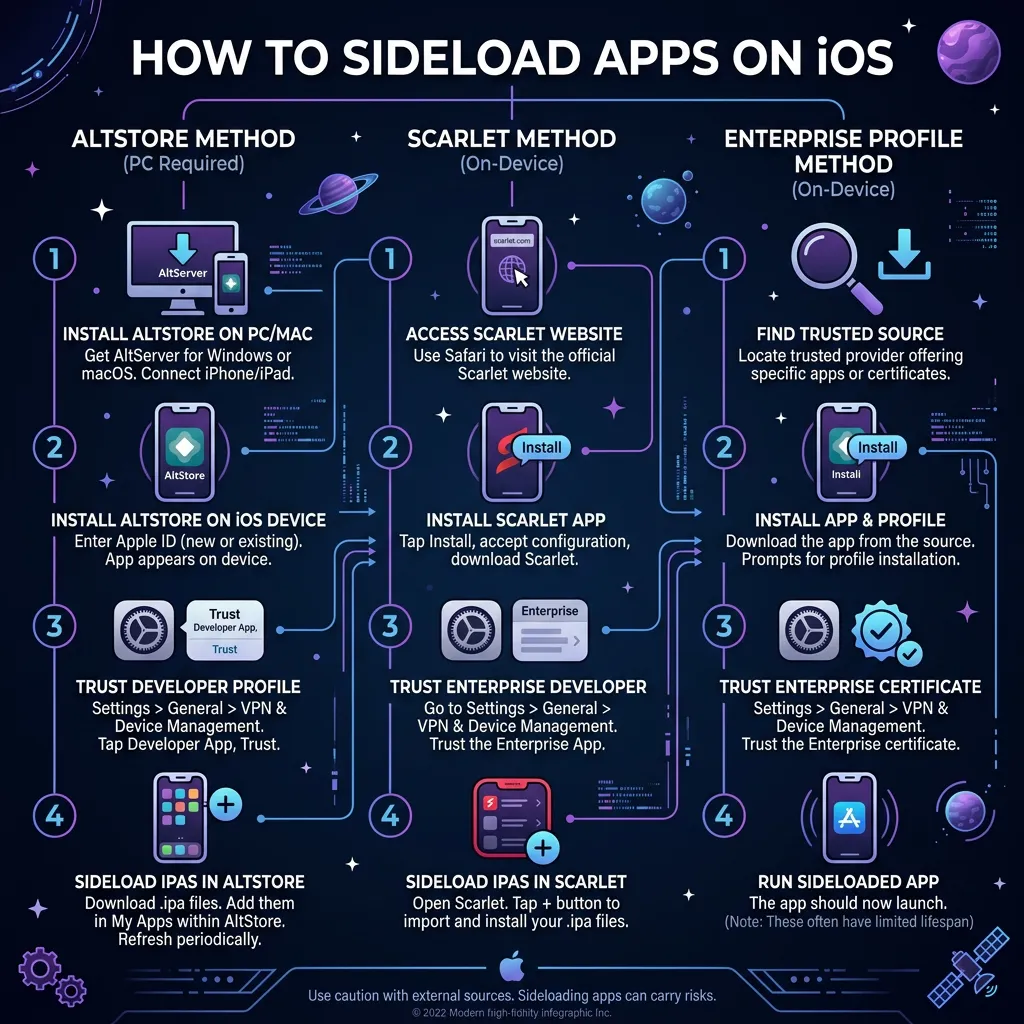
The general concept is:
The exact process depends on the tool, iOS version, Apple account type, certificate, and current Apple restrictions. Because those details can change, a guide should not pretend that one sideloading procedure will work forever.
What Is Direct Install on Delta iOS?
A direct-install method generally means that the application is delivered to the iPhone through a signing/distribution mechanism without requiring the user to manually load the IPA through a computer each time. This can be convenient.
The downside is that the certificate or distribution method can stop working. A current Delta page advertises a direct-install route and explains that users may encounter an untrusted developer message during the process. That is why direct install should be treated as a distribution method, not as proof that the application is officially endorsed by Apple or Roblox.
Delta iOS Direct Install Not Working
If direct installation suddenly stops working, check: certificate status (expired or revoked), iOS version (current release may require a different OS version), installation source (no longer serving signed builds), existing installation conflicts, device storage space, or Apple security restrictions blocking the application launch. Do not keep reinstalling the same broken certificate.
Delta iOS Certificate Revoked Fix
If the certificate is revoked, there is usually nothing you can repair inside the Delta application itself. The certificate is part of the signing process. A new valid signing arrangement may be required.
This is why websites promising a permanent “no revoke” certificate should be treated carefully. Certificates can change, and Apple can invalidate them. A trustworthy guide should explain this rather than promising that an installation method will work forever.
Delta iOS App Won't Open
If Delta was working and suddenly stopped opening, ask: Did the certificate change? Did iOS update? Did the application update? Was the application removed or revoked? Did the signing profile change? Does Roblox itself still open normally? This diagnostic approach is much better than immediately deleting the application.
Delta iOS “Unable to Verify App” Error
If iOS says it cannot verify the application, the issue may involve the application's signing or trust status. Check whether the source is legitimate, whether the developer profile is still valid, whether the certificate has been revoked, whether the application was installed correctly, and whether the iOS version is supported. Do not follow random instructions telling you to disable security features. The goal should be to identify why iOS cannot verify the application.
Delta iOS “Developer Not Trusted” Error
This message can appear when an application was installed through a distribution method that requires a developer or organization profile to be trusted. Current Delta installation documentation describes this situation as part of its direct-install process. Before trusting anything, verify the source. If you do not recognize the developer or organization, do not approve the profile simply to make the application open.
Delta iOS App Crashes
If Delta installs but crashes, there are several possible causes: unsupported iOS version, incompatible build, damaged application, invalid signing, certificate problem, Roblox update, device compatibility, or temporary service issues.
If the application crashes immediately after a certificate change, the signing environment deserves particular attention. If it crashes only after Roblox opens, investigate Roblox compatibility separately.
Delta iOS and Roblox Updates
Roblox updates can affect third party tools. A Delta build that worked with one Roblox release may stop working after a later client change. This can happen because third party tools depend on behavior that can change when Roblox updates its application or security systems.
Therefore, a useful Delta iOS page should always distinguish between the Delta version, Roblox version, iOS version, device model, and script version. These are separate variables.
Why Does Delta Stop Working After a Roblox Update?
The most likely explanation is a compatibility change. Roblox can change its application and security systems. Third party tools may then need to adapt. This creates the familiar pattern: Roblox update ➔ Delta compatibility changes ➔ old build may fail ➔ users report errors ➔ new Delta build may appear. This does not happen on a fixed timetable. So do not assume that every Roblox update will have an immediate Delta update.
Delta iOS and Roblox Security
This is one of the most important trust sections on the page. Roblox states that modified versions of the Roblox application and software that changes the way Roblox works are against its rules. Roblox says this can result in temporary suspension or permanent account action if violations continue.
Roblox also specifically says that jailbroken iOS devices are not supported. Its anti-cheat guidance includes a “Rooted or Jailbroken Device Detected” condition and recommends using an unmodified device. Therefore, jailbreaking an iPhone should not be presented as a normal solution for Delta compatibility.
Does Delta Executor Require a Jailbreak?
A jailbreak is not the same thing as normal iOS application installation. Current public Delta iOS pages describe signed and sideloaded installation methods rather than requiring every user to jailbreak the device. More importantly, Roblox explicitly says it does not support jailbroken iOS devices for its anti-cheat environment. So jailbreaking your iPhone should not be recommended as a routine troubleshooting step.
Delta iOS and Apple Security
Apple's security model is one of the main reasons iOS installation differs from Android. Apple controls application signing, distribution and device trust more tightly. This has an important effect on third party applications: installation can depend on signing status. That means the same IPA can behave differently depending on how it was signed and installed. This is one of the most important technical facts users need to understand before looking for a Delta iOS download.
Is Delta Executor Safe on iPhone?
Do not assume that an IPA is safe simply because it installs successfully. An IPA is an application package. The important question is: Where did the file come from, and what exactly is inside it?
Before installing an unfamiliar application, consider: Source, Publisher, Signing identity, Requested permissions, File reputation, whether the file has been modified, and whether the installation profile is trustworthy.
Also remember that Roblox warns users about modified applications and exploit-related security risks. Never enter your Roblox password into an unknown Delta download page. Never give an unknown service your Apple account credentials unless you fully understand why they are required and trust the service.
Can Delta iOS Steal Your Roblox Account?
The risk depends on the exact application and source. A fake Delta application could be modified to behave differently from the version a user expects. That is why “Delta” in the file name is not enough. Roblox itself warns that modified applications can be used to steal account information. The safest rule is simple: Never enter your Roblox password into an unofficial executor or key website.
Can Delta iOS Get Your Roblox Account Banned?
There is a real risk. Roblox says using modified versions of the Roblox app or software that changes how Roblox works violates its rules and can lead to account action. No website should promise: "No ban", "Anti ban", "Undetectable forever", "100% safe", or "Impossible to detect". Those claims cannot be guaranteed. If your Roblox account contains valuable items, Robux or years of progress, understand the risk before using third party software.
Delta iOS and Jailbroken Devices
A jailbroken iPhone changes Apple's normal security environment. Roblox specifically states that jailbroken iOS devices are not supported in its anti-cheat guidance. If Roblox reports that a jailbroken device has been detected, the correct approach is not to keep changing Delta settings. Use an unmodified supported device for normal Roblox access.
Delta iOS and App Store
Do not confuse the Delta Emulator available through Apple's App Store with Delta Executor. These are different products. The App Store application called Delta is a Nintendo game emulator. Current iOS emulator coverage confirms that Delta Emulator is distributed through Apple's App Store for systems such as NES, SNES, Game Boy, GBA, N64 and Nintendo DS. It is not the Roblox Delta Executor discussed on this page. This distinction is important because searching simply for “Delta iOS” can produce completely unrelated results.
Delta Executor vs Delta Emulator
The names are similar, but the applications are different:
| Delta Executor | Delta Emulator |
|---|---|
| Roblox scripting tool | Retro game emulator |
| Third party Roblox ecosystem | Nintendo console emulation |
| Commonly distributed outside App Store | Available through App Store |
| Associated with Roblox scripts | Associated with ROM-based retro gaming |
| IPA/sideload discussions | App Store distribution |
This is a major search-intent distinction. If someone searches for Delta iOS, search engines can interpret the query in more than one way. Our page should clearly explain the difference.
Delta Executor iOS vs Android
The two versions serve similar broad interests but have very different technical environments.
| iOS | Android |
|---|---|
| IPA | APK |
| Apple signing | Android package installation |
| Certificates & Provisioning | Different permission model |
| Trust profiles | More flexible external installation |
| iOS/iPadOS restrictions | Different device compatibility issues |
| More controlled distribution | Simpler setup flow |
This is why an Android tutorial should not simply be copied into the iOS page.
Delta Executor iOS vs PC
PC introduces another completely different environment. Android users can run an Android package directly on their device. PC users commonly look at an Android emulator route. iPhone users have to deal with Apple's signing and distribution system.
So the three platforms should have separate guides: Android (APK and Android device compatibility), PC (Windows and Android emulator environment), and iOS (IPA, signing and Apple device compatibility). That separation also gives each page a clear search purpose.
Delta iOS Key
Some Delta iOS releases use a key or verification process. The exact system can change between versions. If your release requires a key, check the current instructions for that particular build. Common problems include: expired keys, invalid keys, verification loops, browser issues, server problems, and version mismatches. Do not give your Roblox password to a key website. A key system should not require unnecessary sensitive information.
Delta iOS Key Not Working
If your key is rejected, check the basics first. Confirm the Delta version (keys for other builds may not work), check the key status (expiration), check the service status (server issues), check your connection, and check the browser settings. If the same key works nowhere, the problem may be with the service rather than your iPhone.
Delta iOS Scripts
Delta iOS and Roblox scripts are separate pieces of the setup. A working executor does not mean every script will work. A script can fail because the Roblox experience changed, the script is outdated, the script was designed for another executor, the script depends on unavailable functionality, Roblox introduced security checks, or Delta changed compatibility. This is why script compatibility should always be treated separately from iOS installation.
Delta iOS Script Not Working
If the executor opens but a script fails, ask: Does another compatible script work? (If yes, the problem may be specific to the first script). Did Roblox recently update? (If yes, compatibility may have changed). Does every script fail? (Then investigate the Delta build and Roblox environment). This diagnosis is much more useful than immediately reinstalling the application.
Delta iOS Not Compatible
An “incompatible” message can refer to several different things: unsupported iOS version, unsupported device model, IPA built for another environment, invalid signing method, outdated application, Roblox changes, jailbroken device, or service unavailability. Always identify which application generated the message. A Delta error and a Roblox error are not necessarily the same problem.
Delta iOS Installation Failed
If installation fails before the application opens, check: available storage, iOS version, device compatibility, IPA integrity, signing status, installation method, and existing Delta installation conflicts. If the installation method uses a certificate, the certificate may be the problem. If the IPA itself is damaged, signing it again may not help.
Delta iOS Profile Not Appearing
If an installation method expects a developer or organization profile but nothing appears in the relevant settings, the installation may not have completed correctly. Check whether the application actually installed, whether the profile was generated, whether the certificate is still valid, whether the installation source is working, and whether your iOS version supports the method. Do not install unrelated profiles simply to make a third party application appear.
Delta iOS Keeps Reinstalling
Repeated installation can happen when the current distribution method is unstable or the certificate keeps becoming invalid. Instead of repeatedly reinstalling, identify whether the underlying problem is: certificate, provisioning, IPA, iOS, device, or server. Once you know the layer causing the problem, troubleshooting becomes much easier.
Delta iOS Storage Requirements
The exact Delta file size changes between releases. Public Delta pages currently show iOS builds around the 100 MB range, with one current page listing approximately 117 MB for its published release. The actual space required on your device can be higher because iOS also needs temporary space during installation and the application may create additional data. If your iPhone is nearly full, free some storage before attempting a large application installation.
How to Update Delta Executor on iPhone
Updating an iOS third party application depends on the distribution method. If you are using a signed IPA, you may need to install the newer build through the same or another valid signing method. Before updating, check the new version, read what changed, confirm the build is intended for your iOS version, and check whether the signing method is still active. Do not assume every new version is automatically better.
Why Does Delta iOS Get Revoked?
A certificate or signing arrangement can be invalidated. This is one reason third party iOS applications can suddenly stop working. The important point is: revocation is not necessarily caused by your iPhone. If many users lose access at the same time, the signing infrastructure may be the common factor. This is also why “permanent certificate” claims should be treated cautiously.
Is There a Permanent Delta iOS Certificate?
You should be skeptical of claims that a third party certificate can never be revoked. Apple controls certificate validity and application distribution. A website cannot honestly guarantee that an external signing certificate will remain valid forever. A better guide explains the possibility of revocation and tells users how to recognize the problem.
Why Isn't Delta iOS Opening Today?
If Delta worked recently and suddenly stopped, check these first: certificate status, iOS updates, Delta updates, installation profiles, Roblox updates, internet connection, device storage, or current service status. If several users experience the same issue at the same time, a wider service or signing problem becomes more likely.
Delta iOS Status
A useful status page should separate different problems. Instead of simply saying "Delta: Working", we should show the status of individual components:
| Component | Status |
|---|---|
| iOS application | Check current build |
| Signing | Check current certificate |
| Direct install | Check availability |
| IPA | Check current release |
| Key system | Check current service |
| Roblox compatibility | Check latest Roblox update |
| iPhone support | Depends on device and iOS |
This is a better model because an application can be working while the certificate used by one installation method is down.
Delta iOS Safety Checklist
Before installing a third party iOS application:
- Verify the source: Do not download from a random page simply because it ranks highly.
- Verify the application: Check what you are actually installing.
- Be careful with profiles: Do not trust unknown enterprise or developer profiles.
- Protect your Roblox account: Never give your Roblox password to an unofficial application or key website.
- Avoid jailbreak instructions: Roblox does not support jailbroken iOS devices for its anti-cheat environment.
- Understand account risk: Third party exploit tools can violate Roblox rules.
Delta Executor iOS: Common Problems at a Glance
| Problem | Possible cause |
|---|---|
| App will not install | IPA, signing, storage or compatibility |
| App will not open | Certificate, profile or unsupported build |
| Untrusted developer | Trust/profile issue |
| Unable to verify | Signing or certificate problem |
| Worked yesterday | Certificate or service change |
| Roblox crashes | Compatibility or Roblox security |
| Script fails | Script or Roblox update |
| Key fails | Verification service or expired key |
| App disappears | Installation/signing problem |
| iOS says unsupported | Device or OS compatibility |
| Everything stopped | Certificate, service or Roblox update |
Frequently Asked Questions
Is Delta Executor available for iOS?
Public Delta sites currently advertise iOS versions for iPhone and iPad, including IPA and direct-install methods. Availability can change because third party iOS distribution depends on signing and certificates.
Does Delta Executor work on iPhone?
It can depend on the current build, iOS version, device model, signing method and Roblox compatibility. A published iOS version does not guarantee that every installation method will work at all times.
Does Delta Executor work on iPad?
Public Delta pages advertise iPad support, but actual compatibility depends on the specific release and iPadOS environment. Roblox currently supports iPadOS 14 and later on supported devices.
What is Delta Executor IPA?
IPA is the application package format used for iOS and iPadOS applications. Delta iOS releases are commonly distributed as IPA files when users install them through a supported sideloading method.
Can I install Delta IPA directly on iPhone?
An IPA generally needs an appropriate signing and installation method. Simply downloading the file does not guarantee that iOS will install it.
What is Delta iOS direct install?
It is a distribution method that allows an iOS application to be installed without manually loading the IPA through the usual computer-assisted process. The method depends on valid signing and can stop working if the certificate is revoked. Current Delta pages advertise such a method.
Why does Delta say “Untrusted Enterprise Developer”?
The application was installed through a distribution method that requires the associated developer or organization profile to be trusted. Verify the source before trusting any profile.
Why does Delta iOS say “Unable to Verify App”?
The application may have an invalid or revoked signing arrangement, an installation problem, or another trust issue.
Why was Delta working yesterday but not today?
A certificate or signing service can change independently of the IPA itself. A Roblox or iOS update can also change compatibility.
What does certificate revoked mean?
It means the certificate used for the relevant application distribution has been invalidated. An application relying on that certificate may stop launching.
Can I fix a revoked Delta certificate from my iPhone?
You generally cannot repair Apple's certificate status from inside Delta. A valid distribution/signing method may be required.
Does Delta Executor require jailbreak?
Not every public iOS installation method requires a jailbreak. More importantly, Roblox explicitly states that jailbroken iOS devices are not supported for its anti-cheat environment.
Is Delta Executor safe on iPhone?
Do not assume every IPA using the Delta name is safe. Verify the source and understand what profile or certificate you are installing. Roblox also warns about modified applications and exploit-related security risks.
Can Delta Executor steal my Roblox account?
A malicious or modified third party application could create security risks. Never enter your Roblox password into an unofficial executor or unknown website.
Can Delta Executor get my Roblox account banned?
There is a real risk. Roblox states that modified applications and software that changes how Roblox works violate its rules and can result in account action.
Does Delta Executor work on iOS 17?
Compatibility depends on the specific Delta build. Your iPhone must also meet Roblox's current requirements.
Does Delta Executor work on iOS 18?
The same principle applies. Do not assume an older Delta build supports every newer iOS release.
Does Delta Executor work on iOS 19?
Check the specific Delta build rather than relying on an old compatibility list. iOS compatibility can change between releases.
Does Delta Executor work on the latest iOS?
There is no permanent yes or no answer. A Delta build must be compatible with the current iOS version, and its signing method must also remain valid.
Why is Delta iOS not installing?
Possible causes include an invalid signature, revoked certificate, incompatible build, low storage, damaged IPA or unsupported iOS version.
Why does Delta iOS crash?
The cause can be an incompatible build, signing problem, iOS change, Roblox update or device limitation.
Why is Delta iOS key not working?
The key may be expired, invalid, unavailable, or associated with another release.
Why is Delta iOS not working after a Roblox update?
The Roblox client may have changed in a way that affects compatibility with the current Delta release or individual scripts.
Is Delta Executor the same as Delta Emulator?
No. Delta Emulator is a separate iOS application for retro console emulation. It is available through the App Store and is unrelated to the Roblox scripting tool discussed here.
Is Delta Executor an official Roblox application?
No. Delta Executor is a third party tool. Roblox does not endorse software that changes how its application works.
Final Thoughts
Using Delta Executor on iPhone or iPad is a different experience from using it on Android. The main reason is Apple's application distribution system.
On Android, users commonly deal with APK files and Android installation permissions. On iOS, users may encounter IPA files, signing, certificates, provisioning, trust profiles and revocation. That creates a different set of problems.
A Delta iOS installation can stop working even when the IPA itself has not changed. A certificate may become invalid. An iOS update may change compatibility. Roblox may change its own application or security systems. A script can also stop working independently of Delta.
This is why the best way to evaluate Delta iOS is not simply to ask: “Does Delta work on iPhone?” The better questions are: Which iOS version are you using? Which iPhone or iPad do you have? Which Delta build are you using? How was it signed? Is the certificate still valid? Is Roblox currently compatible with the environment? Is the problem with Delta, the certificate, Roblox, or the script? Those distinctions make troubleshooting much easier.
Finally, remember that Delta Executor is not an official Roblox product. Roblox states that modified applications and software that changes how Roblox works are not allowed and may result in account action. For that reason, never trust claims such as “100% undetectable,” “permanent certificate,” or “zero ban risk.”
A useful Delta iOS resource should tell you what is known, what changes over time, and what risks exist rather than promising something that cannot be guaranteed.